




Why Won’t My Electric Bike Turn On?
There’s nothing more frustrating than getting ready to ride, pressing the power button on your electric bike, and getting no response. The display stays dark, and the motor makes no sound at all. If this happens right before you need to leave, it can be especially annoying. Before you start worrying about expensive repairs or being without your bike for weeks, start with a few simple checks. This guide walks you through electric bike troubleshooting step by step. We’ll cover the basic things you can check first, then move on to more advanced tests if the problem is still there.
The most frequent causes, those which can be corrected in just a few minutes, are the ones we'll look at first. The good point is that the majority of "no power" problems are surprisingly easy to resolve and do not at all require a technician. By following this guide you may fix your issue right away and avoid having to go to the workshop, as well as the cost of having a professional carry out a diagnosis. These steps apply to all kinds of e-bikes, whether they are city bikes or powerful 750 watt electric bike models.
The Five-Minute Fixes
Before you jump to the conclusion that there's a problem, go over the very first things that you should check. These are the most common issues which can cause an electric bike to seem completely dead all of a sudden and with no prior warning signs.
1. Is the Battery Switched On?
It might seem like an obvious point, but this is the most common cause of an e-bike failing to power up. A number of e-bike batteries come with a dedicated physical on/off switch or require a key to be inserted and then turned to the 'On' position, something that is distinct from pressing the power button on the handlebar display. Look on the battery case for a small rocker switch, a push-button, or a key slot that regulates the main power and ensure that it is firmly in the 'On' or 'I' position.
2. Is the Battery Seated Firmly?
- Set the battery key to unlock.
- Take the battery out of the bike's frame completely.
- Check the contacts on both the battery and the bike's cradle by looking for any dirt, debris, or any obvious damage that could be preventing the connection.
- Put the battery back into its mounting position with care. An experienced mechanic would advise you to hear a satisfying 'click' which means it has locked firmly in place. Finally, give it a slight wiggle to make sure it does not move.
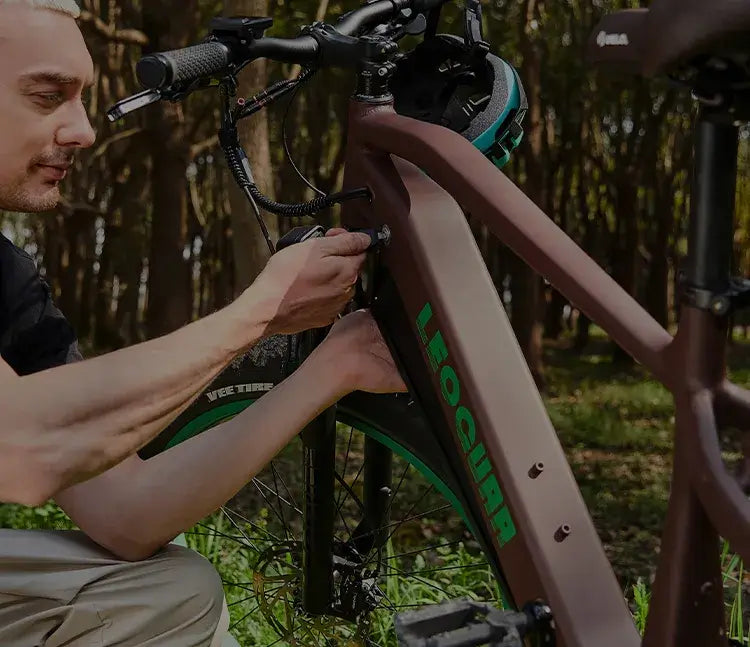
3. Are All Connections Secure?
- From the battery to the controller: the main cable which comes from the battery cradle.
- The display connector is the cable that extends from your handlebar display.
- Motor connector: The thick cable which runs to the hub motor (typically located at the rear axle).
- Motor Inhibitors: Check the connectors that extend from the brake levers since these usually have a special colour (for example, red or yellow) and are intended to cut off the power when braking as a safety measure.
Make sure that each of these connectors is fully inserted by gently but firmly pressing them together.
4. Is the Display Button Working?
To turn on most electric bike displays you need to carry out a long press—that is, hold the power button down for 2 to 3 seconds—since a simple tap won't work, just as is the case with many smartphones and other electronic devices. So, press the power button down for a full five seconds and check whether anything occurs. If the device still fails to switch on, check the button carefully by feeling it. Does it give a tactile 'click' when you press it or does it feel soft and unresponsive? Although a defective button is uncommon it is still possible.
Investigating the Power Source
If the quick checks haven't got your bike working again then the next sensible thing to do is to examine the power system itself. The battery is the heart of your electric bike and checking that it is in good condition is a vital part of the process of troubleshooting.
Checking the Charger
- Put your charger into a wall socket that is known to be working (you can check this by using a lamp or phone charger).
- Before you connect the charger to the battery, check the indicator light on the charger's brick; most chargers display a solid green light when they have power but are not charging anything.
- Insert the charger into the charging port on the battery and the indicator light should change, typically to solid red, which means the battery is being charged.
- When the light remains green, this indicates that the charger does not consider the battery to be one that requires charging. If there is no light whatsoever, then the charger might be faulty.
Inspecting the Ports
A bad connection may stop the device from charging even though both the charger and the battery are working properly. Remove all the devices and carefully examine the charging port on the battery as well as the pin at the end of the charger cable for any obvious issues. Check whether there is any dirt, dust, or moisture that could disrupt the electrical connection and also look for any pins inside the port that are bent or broken since these could stop proper contact. As a professional suggestion, use a soft, dry brush or a can of compressed air to gently remove any debris you discover. It is important not to use a metal object such as a paperclip, because this might cause a short circuit and result in permanent damage to the battery.
Waking the BMS
There is a vital part inside the battery known as the Battery Management System (BMS). This acts as the battery's built-in computer and looks after its health, safety, and performance whether it is being charged or discharged. Should the battery remain fully discharged for a long time, the BMS might cause it to enter a deep 'sleep' or 'protection' mode in order to avoid damage due to over-discharge. In this condition, the battery will not allow a charge to be taken on or supply power to the motor system. In order to get the BMS out of this state, you can leave the battery connected to the charger for a long time, perhaps as long as 8 to 12 hours without stopping. This may be sufficient to give a slight trickle charge that will enable the BMS to wake up and start a normal charging cycle once again. Additionally, some batteries are equipped with a small 'reset' button on the case which can have the same effect.
Checking the Cockpit
Even if the battery and charger are in good condition, the issue could be with the bike's controls or safety features. The parts located on the handlebars are known as the 'brain' of the system, and a fault in this area can stop the whole system from switching on even if all the other parts are working correctly.
Inspect the Display Unit
- Carefully examine the display for any physical damage, for example a cracked screen or case. Damage to the internal circuits caused by water entering it as a result of heavy rain or use of a pressure washer can lead to total failure.
- Follow the wire as it goes from the display and into the bike's frame. Look for any places where the cable may have been squeezed, stretched, or cut during usual use or maintenance.
- As I explained earlier, press the power button and look for a firm "click", which means that the button is working correctly. If the button feels stuck or gives no feedback, then the button itself might be faulty.
The Brake Lever Cut-off
- Carefully check both brake levers to see if they return completely to their original position when you release them after pressing them; a lever that is even slightly pressed could trigger the sensor.
- On the basis of our experience, a simple solution is to manually pull the brake levers off the handlebars to make sure that they are completely disengaged; the levers can sometimes stick a bit because of dirt or cable tension.
- Should this not work, you can carry out a diagnostic test by tracing the small wires that come from each brake lever to their connectors and then carefully removing them. Remove one of the brake sensors and attempt to switch on the bicycle; if the bike then starts up, it means that you have identified the defective sensor which was causing the issue. If the bike does not start, put the sensor back again and then try with the other one.
Advanced Diagnostics: Multimeter
Caution: When working with electricity, take care. Although the voltage of a battery is direct current and therefore not dangerous, shorting the terminals may result in sparks and cause permanent damage to the battery. Make sure to wear safety glasses and work in a place with good ventilation.
What You'll Need
- A digital multimeter
- Safety glasses
| Battery Nominal Voltage | Expected Full Charge Voltage |
|---|---|
| 36V | ~42.0V |
| 48V | ~54.6V |
| 52V | ~58.8V |
How to Check Battery Voltage
- Switch your multimeter to the DC Voltage setting (V⎓ or VDC) and select a range that is greater than the voltage rating of your battery for both safety and accuracy.
- With a 48V or 52V battery the 200V setting is safe. Make sure you find the positive (+) and negative (-) terminals on the main discharge port of your battery (the one that connects to the Long Range Electric Bikes, not the charging port).
- Take the red probe of the multimeter and carefully contact the positive terminal, placing the black probe on the negative terminal. Make sure the two probes do not touch each other since this might damage the meter or the battery.
- Look at the reading on the multimeter display; a battery that is in good condition and fully charged will show a voltage considerably higher than its nominal voltage, whereas a dead or damaged battery will display only a very small or no voltage at all.
How to Check the Fuse
- Switch your multimeter to the 'Continuity' setting, which is generally indicated by a soundwave or diode symbol on the dial.
- Check the setting by briefly touching the probes together and the device should emit a beeping sound to confirm that it is working. Remove the fuse from the battery safely by using the method that is correct for your particular battery model.
- Place one of the probes at each end of the fuse. In that case, if the multimeter beeps then the fuse is good and current can flow through it normally.
- If there's no beep then the fuse has blown and must be replaced by one that has the same amperage rating. Using the wrong amperage may damage your bike or cause safety hazards.
Specifics for Your 750 Watt Bike
People who own an electric bike with a power rating of 750 watts should keep in mind one further factor when carrying out troubleshooting. Unlike smaller motors with a power output of 250 watts or 500 watts, these more powerful motors draw a great deal more electrical current from the system while in operation. This higher level of demand places more stress on all the components in the power delivery chain, in particular on the controller and the battery's BMS, and as a result may cause various types of failure.
Controller failure is more frequent in these high-power models because of the greater electrical load. When a controller fails, there are usually no visible signs of damage; it just stops working and therefore leaves the bike completely dead with no reaction to any inputs. For this reason, carrying out all the earlier diagnostic steps becomes even more important when dealing with high-power bikes. If you systematically eliminate the possibility of problems with the battery, charger, the connections, and the display, you can be more certain about identifying the controller as the most probable cause before deciding to order a replacement part.

When to Call for Service
If you have carefully carried out each and every step in this guide—starting with checking the battery seat and then testing the voltage with a multimeter—and your electric bike still fails to turn on, then you have carried out a complete diagnosis and have thus eliminated all the usual problems which are capable of being fixed by the user as the main cause of power failures in electric bikes.
By now the problem is probably due to a more complicated internal part, for example the controller, the wiring harness, or a more fundamental fault in the battery's BMS that can only be diagnosed using professional equipment. This is the moment when you should confidently get in touch with a professional e-bike servicing centre for expert assistance. Give them a full account of all the steps you have already taken, since this will cut down on the time they need for diagnosis and will also help you avoid paying high labour charges. You've already done your research, so you can hand the issue over knowing that it needs the expertise and special equipment of a professional.
FAQ
How long do I need to press the power button in order to turn on my electric bike?
A: Most e-bike displays need the power button to be pressed for two to three seconds in order to turn on; therefore, hold the power button for a full five seconds to make sure it has enough time to activate. A simple tap generally won't work.
My electric bike functioned yesterday but isn't starting today—what is the most probable reason?
A: Check that the battery switch is on and that the battery is properly inserted into its cradle since a bumpy journey could slightly dislodge it and as many batteries have their own on/off switch this is something that is easy to overlook.
Can testing the battery with a multimeter cause damage to it?
A: It is generally safe to test the voltage as long as you proceed with care, but you should always wear safety glasses and make sure not to touch the probes together. Although the direct current voltage in e-bike batteries is fairly low, shorting the terminals may result in sparks and damage.
How can I tell if my brake sensors are causing the power problem?
A: Make sure the brakes are fully released by pulling both brake levers completely away from the handlebars. If that doesn't solve the problem, then unplug each brake sensor one at a time and attempt to turn the bike on in order to find the faulty sensor.
What should I do if my 750 watt electric bike controller fails?
A: Controller failure is more common in high-power bikes due to increased electrical stress. If you've ruled out battery, charger, and connection issues through testing, a failed controller likely needs professional replacement as it requires specialized knowledge and tools.


Leave a comment